Guardrails
Guardrails let DeltaLLM inspect requests or responses and block, log, or sanitize content before it reaches the client.
Quick Path
For a fast first rollout:
- Start with one pre-call guardrail
- Keep
default_on: trueso it protects every request - Use
default_action: blockfor strict enforcement orlogwhile evaluating impact - Add scoped overrides later for specific organizations, teams, or API keys
Example with built-in PII detection:
deltallm_settings:
  guardrails:
    - guardrail_name: presidio-pii
      deltallm_params:
        guardrail: src.guardrails.presidio.PresidioGuardrail
        mode: pre_call
        default_on: true
        default_action: block
        anonymize: true
        threshold: 0.5
        entities:
          - EMAIL_ADDRESS
          - PHONE_NUMBER
          - US_SSN
How It Feels In Practice
Here are simple examples of what guardrails do during normal use.
Example 1: Block sensitive data before it reaches the model
An admin creates a global guardrail:
- Type:
PII Detection - Mode:
pre_call - Action:
block
Then a user sends:
What happens:
- DeltaLLM receives the request.
- The guardrail checks the prompt before the model call.
- It detects sensitive data.
- DeltaLLM blocks the request.
- The user gets a structured guardrail error response.
Result:
- the model provider never sees the SSN
Example 2: Redact instead of block
An admin creates a global guardrail:
- Type:
PII Detection - Mode:
pre_call - Action:
log anonymize: true
Then a user sends:
What happens:
- DeltaLLM checks the prompt before sending it to the model.
- The guardrail finds the email address and phone number.
- DeltaLLM replaces them with placeholders like
<EMAIL_ADDRESS>and<PHONE_NUMBER>. - The request continues.
Result:
- the user still gets an answer
- the raw personal data is not passed to the model
Example 3: Stop prompt injection
An admin creates a global guardrail:
- Type:
Prompt Injection Detection - Mode:
pre_call - Action:
block
Then a user sends:
What happens:
- DeltaLLM checks the prompt before the model call.
- The prompt-injection guardrail sees risky content.
- DeltaLLM blocks the request.
Result:
- unsafe instructions never reach the model
Example 4: Check the model output before returning it
An admin creates a guardrail:
- Type:
PII Detection - Mode:
post_call - Action:
block
What happens:
- The user sends a normal request.
- The model generates a response.
- DeltaLLM checks the response before returning it to the user.
- If sensitive data is found, DeltaLLM blocks the response.
Result:
- the model may have generated unsafe output
- but DeltaLLM prevents it from reaching the client
Simple Admin Flow
In the admin UI, the normal flow is:
- Open Guardrails
- Create a guardrail with a built-in preset
- Choose the mode and action
- Save it
- Optionally assign it to a specific organization, team, or API key
After that, requests using that scope are checked automatically.
Built-In Guardrails
DeltaLLM currently ships with two built-in guardrail integrations.
Presidio PII Detection
Use this when you want to detect or redact sensitive personal data in prompts or outputs.
Common settings:
mode:pre_callorpost_calldefault_on: enable by default for all trafficdefault_action:blockorloganonymize: replace detected PII instead of failing the requestthreshold: detection confidence thresholdentities: specific PII types to inspect
Presidio has two runtime modes in DeltaLLM:
- Full engine when the optional Presidio packages are installed
- Regex fallback in the default lightweight install
Regex fallback supports this smaller entity set:
EMAIL_ADDRESSPHONE_NUMBERUS_SSNCREDIT_CARDIP_ADDRESS
To enable the full Presidio engine in Docker:
For local development from source:
Lakera Prompt Injection
Use this when you want to detect prompt injection or jailbreak-style content.
deltallm_settings:
  guardrails:
    - guardrail_name: lakera-prompt-injection
      deltallm_params:
        guardrail: src.guardrails.lakera.LakeraGuardrail
        mode: pre_call
        default_on: true
        default_action: block
        api_key: os.environ/LAKERA_API_KEY
        threshold: 0.5
        fail_open: false
Common settings:
api_key: Lakera Guard API keythreshold: score threshold for blockingfail_open: allow traffic through if the external guardrail service is unavailable
Lakera requires an API key. The admin UI now warns and blocks save if the key is blank, so you do not end up with a guardrail that silently skips checks.
How Scope Resolution Works
Guardrails can be assigned at these levels:
DeltaLLM starts with the global default set, then applies scoped changes from top to bottom.
Each scope can use one of two modes:
| Mode | Meaning |
|---|---|
inherit |
Start from the parent scope, then add or remove guardrails |
override |
Replace the parent result with the local list |
This makes it easy to keep one safe platform default while giving a specific team or key a narrower or broader policy.
Simple example:
- Global: PII detection is enabled for everyone
- Team A: adds prompt-injection detection too
- API Key X: overrides the defaults and uses only one specific guardrail set
That means two users on the same platform can get different guardrail behavior depending on the organization, team, or API key they use.
Admin UI and Admin API
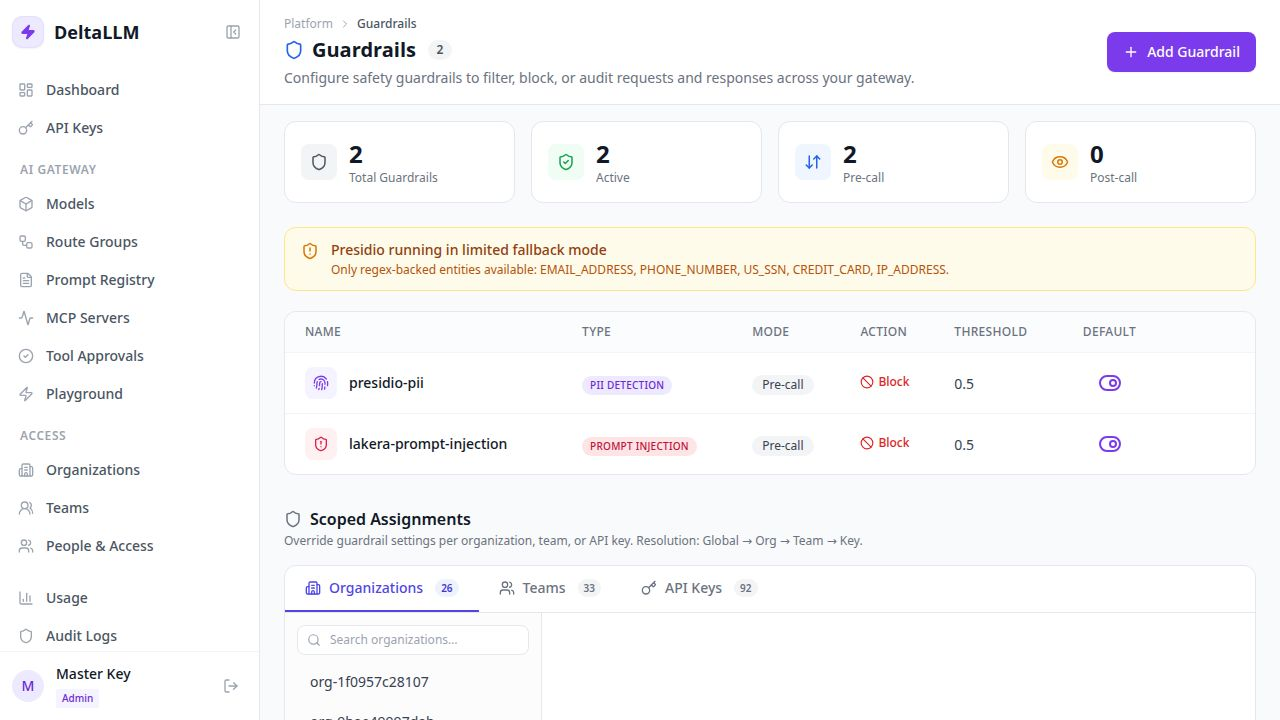
The Guardrails page is the easiest way to manage policy. It exposes built-in presets for the bundled Presidio and Lakera integrations, plus an advanced custom mode for raw class-path configuration. The same capability is available through the admin API and requires platform-admin access.
Read a scoped assignment:
curl http://localhost:8000/ui/api/guardrails/scope/organization/org-123 \
  -H "Authorization: Bearer YOUR_MASTER_KEY"
Set a scoped assignment:
curl -X PUT http://localhost:8000/ui/api/guardrails/scope/organization/org-123 \
  -H "Authorization: Bearer YOUR_MASTER_KEY" \
  -H "Content-Type: application/json" \
  -d '{
    "guardrails_config": {
      "mode": "inherit",
      "include": ["presidio-pii"],
      "exclude": []
    }
  }'
Remove a scoped assignment:
curl -X DELETE http://localhost:8000/ui/api/guardrails/scope/organization/org-123 \
  -H "Authorization: Bearer YOUR_MASTER_KEY"
Advanced Notes
- If no org, team, or key override exists, DeltaLLM uses only the global defaults marked
default_on: true. - A key can still use a direct guardrail list, but scoped config is the clearer long-term pattern.
- Guardrail violations are returned as structured proxy errors, including the guardrail name.
- Use
logduring rollout if you want visibility before enforcement.
In simple terms:
pre_call= check the request before the model sees itpost_call= check the response before the client sees itblock= stop the request or responselog= allow it, but record that it happened