People & Access
People & Access is the RBAC and onboarding control surface for platform accounts, invitations, and memberships.
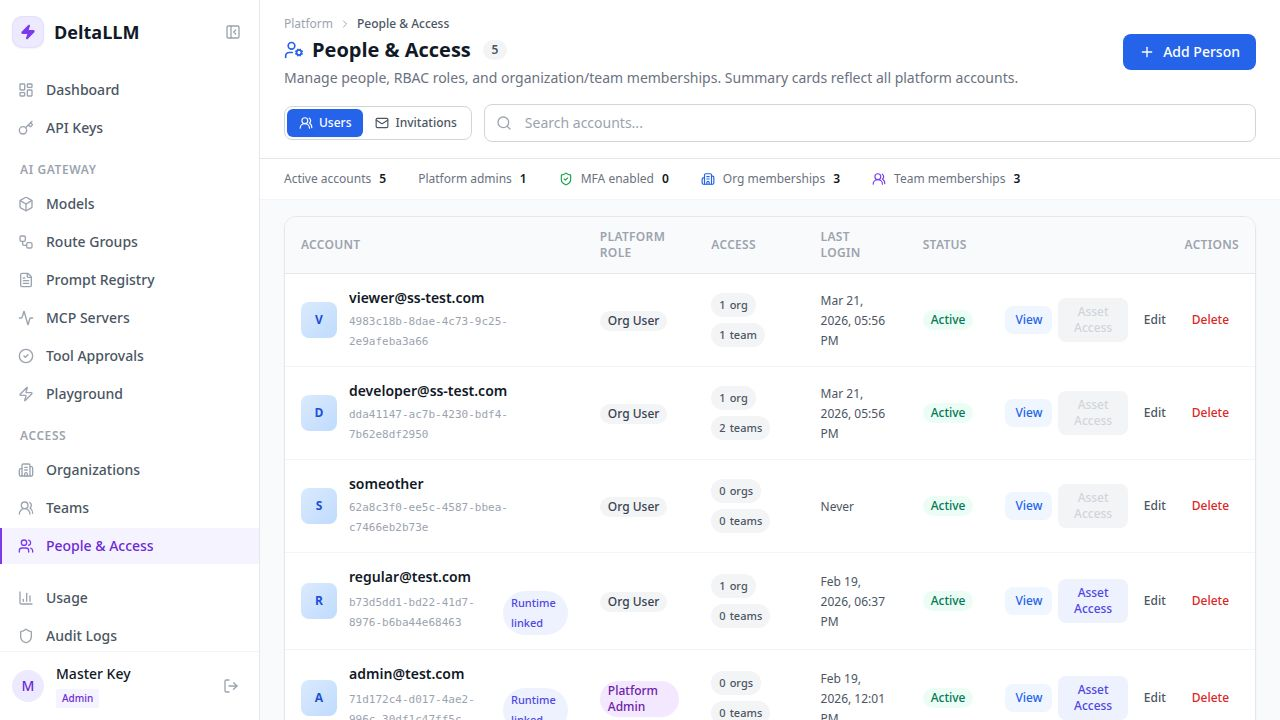
What this page manages
- Platform accounts
- Pending invitations
- Platform roles such as
platform_adminandorg_user - Organization memberships
- Team memberships
- Runtime user asset access for scoped governance
How the page works
- The top list shows platform accounts and their current role
- The invitation panel lets admins invite by email, resend pending invitations, and cancel them
- Expanding an account reveals its organization and team memberships
- Self-registered sandbox users are marked with a sandbox access badge
- Runtime user budgets, rate limits, and self-service key policy are visible from the account details drawer
- Modals let admins add accounts, attach memberships, or edit runtime user asset access without leaving the page
Invitations
People & Access is the main invite-by-email surface.
Use it to:
- invite a new email address into an organization or team
- resend an invite if the user did not receive it
- cancel an invite before it is accepted
Organization and team detail pages deep-link back into this page for invitation workflows.
Recommended onboarding flow
- Invite the user from People & Access
- Let the user accept the invite from their email link
- If the user has no auth method yet, they set a password during acceptance
- If the user is SSO-only, they can accept without creating a local password
- If the user already has MFA enabled, they accept access first and then complete a normal login flow
Self-Registered Sandbox Users
If general_settings.self_registration is enabled for SSO, eligible first-time SSO users appear in People & Access after their first successful sign-in. Their account details show the seeded organization membership, team membership, runtime user limits, and the default team's self-service key policy.
The badge is informational. Admins can still edit the account, add or remove memberships, adjust runtime user asset access, and update the seeded organization/team records from their detail pages.
Promoting a Sandbox User
To move a developer from sandbox access to production access:
- Open the user in People & Access and confirm the account identity.
- Add the production organization or team membership with the correct role.
- Remove the sandbox team membership if the user should no longer create sandbox keys.
- Adjust runtime user limits or asset access if the production team requires different guardrails.
- Review API Keys and revoke any sandbox keys that should not remain active.
Recommended model
- Use platform role for top-level authority
- Use organization membership for tenant scope
- Use team membership for the most specific working access
- Use runtime user asset access only when a specific user must be narrower than the inherited team and organization asset set
This keeps the access model explicit and traceable.