Guardrails
Guardrails are the policy surface for safety checks and scoped enforcement.
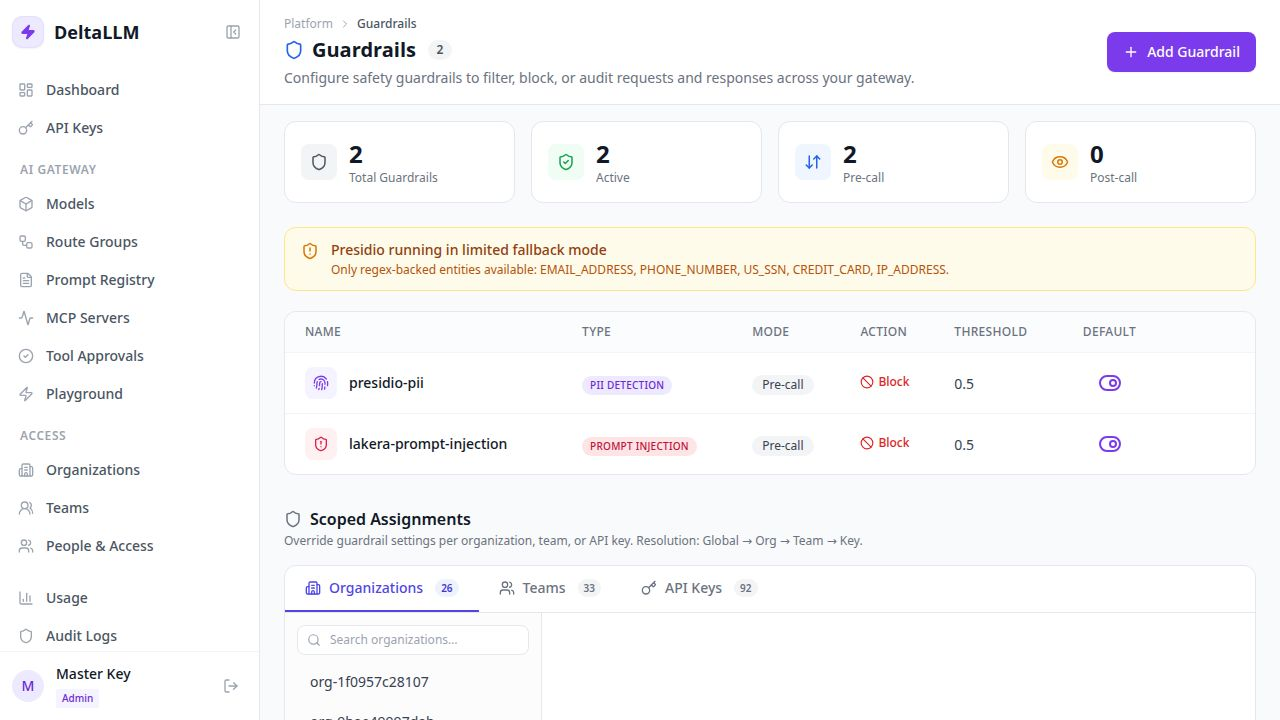
What this page does
- Define reusable guardrail policies
- Choose a built-in preset or advanced custom guardrail class
- Set mode, action, threshold, and default enabled state
- Assign policies at organization, team, or API-key scope
Page structure
- Top table lists the current global guardrail definitions
- Create / edit modal uses preset-based forms for bundled guardrails and keeps raw class paths behind an advanced custom mode
- Scoped Assignments applies policies where they should take effect
- Capability banners show whether Presidio is running with the full engine or the limited regex fallback
Scope resolution
Assignments follow the same hierarchy used elsewhere in the gateway:
- global
- organization
- team
- API key
Use the scoped editor when a policy should apply only to a specific tenant or integration instead of the full platform.
Simple setup example
One common setup is:
- Create a
PII Detectionguardrail - Set
ModetoPre-call - Set
ActiontoBlock - Leave it enabled by default
- Save it
After that, if a user sends sensitive data like an SSN or email address, DeltaLLM can stop the request before it reaches the model.
Another common setup is:
- Create a
Prompt Injection Detectionguardrail - Set
ModetoPre-call - Set
ActiontoBlock - Assign it only to a specific team or API key
After that, only traffic in that scope is checked for jailbreak or prompt-injection style input.
Presidio and Lakera notes
When you open the Guardrails page:
- Presidio shows whether the full engine is installed
- fallback mode limits entity selection to the regex-backed entity set
- Lakera requires an API key before the preset can be saved
To enable the full Presidio engine in Docker:
What the user experiences
If a guardrail is triggered:
- a request can be blocked before it reaches the model
- a response can be blocked before it reaches the client
- or the content can be allowed but logged, depending on the action
For example:
- a user sends a prompt with personal data
- DeltaLLM checks it
- the guardrail blocks or redacts it based on the policy
The user does not need to know which exact rule ran. They just see the result of the policy that applies to their organization, team, or API key.